 Live Chat
 Contact
 Shopping Cart
 Currency
 Language
 English
  Arabic
  French

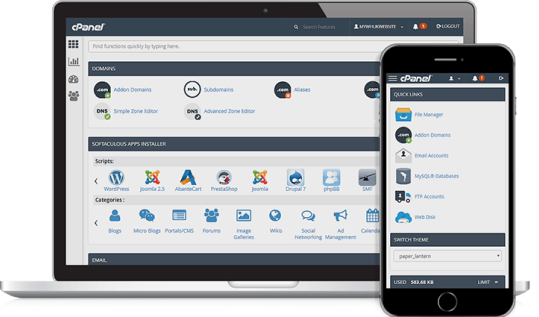
Your whole account lives inside 50MB. cPanel shows the figure on its home screen, so you can watch it fill rather than find out from an error.

It is an ordinary cPanel account on our shared platform: CloudLinux for isolation, LiteSpeed Enterprise as the web server, EasyApache with PHP 8.3, Imunify360 scanning, Cloudflare in front.

Our Service Level Agreement excludes any free trial, promotional period or beta service. A free plan carries no uptime commitment. That is the honest trade for paying nothing.

When the demo works and 50MB starts to pinch, you move to a paid plan in the same client area. Nothing about the free tier is designed to trap your files.
Most free tiers describe their storage and leave you to guess. Here is the arithmetic instead. A static site of hand-written HTML, CSS and a chart library is usually under 3MB. A plain PHP or Flask front end that calls an external model API is a few hundred kilobytes of code. Embeddings for 2,000 text chunks at 384 dimensions, stored as raw float32, come to roughly 3MB, so a small retrieval demo genuinely fits. What does not fit is anything you were planning to download at install time.
Shared hosting is shared hosting. There is no GPU and no CUDA runtime, so nothing on this account will run inference locally. There is no root, no systemd and no long-running daemon, so a persistent inference server or a queue worker that never exits belongs on a cloud server with root access rather than here. Scheduled work goes through cPanel cron. And a sentence-embedding model is on its own usually larger than the whole 50MB allowance, which is why the demos that succeed here call a model somewhere else.
Those last two lines are not house style, they are policy. Our resource usage policies prohibit offering file, document or data storage services, running a public mirror, a proxy or an anonymiser, and reselling from a shared plan. CPU, memory, disk throughput and concurrent processes are capped per account by CloudLinux, and the published figures for each paid tier are on that same page. Read it once now and you will never be surprised by a suspension later.

No build pipeline to learn and no container to configure. It is cPanel, a file upload and a domain, which is exactly why a 50MB account is a sane place to put a first AI project.
Create your ElySpace client account, then pick the free 50MB plan from the product store.
The order form lists every field it needs before you confirm anything. Nothing on this page overrides what that screen tells you.
Use cPanel File Manager or FTP, then attach a domain you already own or register a new one for the project.
Check disk usage in cPanel as you build. When it fills, that is your signal to move up, not a wall you discover at midnight.


If you recognise yourself here, the free tier will do the job. If you do not, the honest answer is that a paid plan will cost you less time than working around 50MB.

Your machine-learning assignment needs a URL your examiner can open, not a notebook they have to run. A 50MB account holds the write-up, the front end and the screenshots, and it stays up after your laptop closes. Put the heavy training artefacts in a repository and link to them.

You have a few hundred documents, a chunker, an embedding call and a question box. Keep the embeddings in a flat file or a small database, call the model over HTTPS, and the whole thing lives comfortably inside the allowance. It is the retrieval half that has to be small, not the model.

Something has to receive the POST: a payment callback while you test, a form handler, a status ping from a workflow you run elsewhere. Three files and a log. If that automation grows into a full workflow engine, it graduates to managed n8n hosting.

A hiring manager will spend ninety seconds on your project. A live page that explains the problem, shows the output and links the code beats a README every time, and it costs you nothing to keep online between interviews.

Before you write the application, put up the page that describes it and see who signs up. If you would rather not hand-code that page, our AI website builder writes one, and you can move the result onto a paid plan when the idea earns it.

ElySpace has been hosting since 2016 and supports over 27,000 customers, but a claim is a claim. Take a free account, look at the cPanel we actually ship, open a ticket and time the reply, then decide whether our cPanel web hosting deserves your card.
There are only three reasons you will outgrow this plan, and each has an obvious next step. If it is disk and traffic, move to shared cPanel hosting. If the demo turned into a content site, managed WordPress hosting is the shorter road, because WordPress core, a theme and two plugins will spend the whole 50MB before your first post. If you need root, a persistent process or a model running on your own metal, that is a VPS with full root access. Ask us before you pick: our team is on live chat and tickets around the clock, and telling you which one you need takes a minute.

That's probably enough from us, we'll let our customers do the talking and with over 2000 reviews on Trustpilot and Facebook, see for yourself why you can trust us to power your website.

 1 year ago
I am a very satisfied customer ElySpace is an excellent hosting company. It provides fast live support and WhatsApp support. The service to its customers is a 5 star rating. Very efficient, helpful and understanding. Highly recommended. Thanks to the whole ElySpace team


 2 years ago
I highly value Elyspace for their outstanding hosting and domain services. Their customer support is exceptional, making them a top choice for my clients.
Elyspace consistently delivers reliability and performance, earning my strong recommendation.
 21 day ago
ElySpace provided seamless domain registration and hosting services. Their user-friendly interface are very nice and their excellent customer support made the whole experience enjoyable and hassle-free.
The Elyspace Team is Experienced. i will definitely recommend elyspace to everyone
 90 days ago
Best platform where u can avail the services at affordable and cheapest prices . Have a support team friendly and having expertise in the field and resolves the issues at the earliest.. I will suggest everyone to connect With ElySpace if you have any issue regarding website or domain and Hosting
 5 months ago
The best hosting company across india. Provides best , affordable plans at best possible prices Plus the team is always ready to help the newbies, The Team is well experienced & great.i really love their services
Highly recommended!

 6 months ago
Elyspace stands out as one of the best hosting and domain service providers globally I've encountered in my career as a web developer. I purchase Elyspace's services , impressed by their excellent customer support and Services. Highly recommended!
Best Support!
 1 day ago
Elyspace is a very nice company. They really care for their customers and prove to be helpful when you face any problems. The support team is very nice.
I would prefer Elyspace over platforms like ElySpace NameCheap and godaddy
Experienced Team!
 2 Years ago
I have been using Elyspace as my web hosting service, and I couldn't be more pleased with their exceptional service.
The team at Elyspace is friendly and supportive, and goes above and beyond to ensure customer satisfaction. Thanks to ElySpace Team