 Live Chat
 Contact
 Shopping Cart
 Irfan Bhat
If you’re building a website in 2026, the shared hosting vs VPS vs cloud hosting decision is probably the first real technical fork in the road. Pick wrong, and you either overpay for resources you’ll never use or watch your site crawl during a traffic spike. Pick right, and hosting becomes something you rarely think about again.
This guide walks through what each option actually does, who it’s built for, and how to match your choice to your budget, traffic, and growth plans — without the jargon. By the end, you’ll know exactly which tier fits your site today, and what signals should push you toward an upgrade tomorrow.
What Is Shared Hosting?

Shared hosting puts your website on a server alongside dozens — sometimes hundreds — of other sites. You all share the same CPU, RAM, and storage pool, which is why it’s the cheapest entry point into web hosting.
For a new blog, a portfolio site, or a small local business page, shared hosting is often more than enough. The trade-off is that a traffic surge on someone else’s site can slow yours down too, a phenomenon sometimes called the “noisy neighbor” effect. You also have less control over server-level configurations, since the hosting provider manages the environment for everyone on that machine.
Most shared hosting plans include a simplified control panel, one-click app installers, and basic security tools, which makes them approachable even if you’ve never managed a server before. The catch is that as your traffic grows, you’re competing for the same finite pool of resources as every other site on that server.
Best for: hobby blogs, small local businesses, personal portfolios, and anyone testing an idea before investing more.
Pros: lowest cost, beginner-friendly, minimal setup, managed by the provider. Cons: limited resources, slower under traffic spikes, less customization, shared security risk.
What Is VPS Hosting?

VPS (Virtual Private Server) hosting still shares a physical machine with other users, but it partitions that machine into isolated virtual servers using virtualization software. You get a guaranteed slice of CPU, RAM, and storage — no noisy neighbors stealing your resources, even during someone else’s traffic spike.
This makes VPS a natural step up once your site outgrows shared hosting: a growing e-commerce store, a membership site, or a business site that needs consistent performance and root-level control. Because you get root access, you can install custom software, fine-tune server settings, and configure caching exactly the way your application needs.
VPS plans typically come in “managed” and “unmanaged” flavors. Managed VPS hosting means the provider handles updates, security patches, and monitoring for you — a good middle ground if you want more power without needing full sysadmin skills. Unmanaged VPS hosting hands you the keys entirely, which suits developers who want maximum flexibility.
Best for: growing businesses, developers who want server-level customization, and sites with predictable, moderate-to-high traffic.
Pros: dedicated resources, root access, better performance consistency, scalable within the plan tier. Cons: higher cost than shared hosting, more technical knowledge required (especially unmanaged), still tied to one physical server.
What Is Cloud Hosting?

Cloud hosting distributes your website across a network of connected virtual servers instead of relying on one physical machine. If one server has an issue, another instantly picks up the load — which is why cloud hosting is prized for reliability and near-instant scalability.
Pricing is often usage-based, so you pay for the resources you actually consume rather than a fixed monthly block. This flexibility makes cloud hosting a favorite for sites with unpredictable or seasonal traffic, like retailers during holiday sales or media sites expecting a viral spike. Because resources can be added or removed on demand, cloud hosting also tends to handle sudden growth far more gracefully than shared or VPS plans.
Many cloud hosting providers also offer built-in load balancing, automated backups, and global content delivery integration, which reduces the amount of manual infrastructure work your team needs to do. That said, usage-based billing means costs can be less predictable month to month if traffic fluctuates significantly.
Best for: high-traffic sites, SaaS platforms, online stores expecting spikes, and businesses that can’t afford downtime.
Pros: high reliability, near-instant scalability, pay-for-what-you-use pricing, strong uptime track record. Cons: costs can fluctuate, potentially more complex to configure, may require more hands-on management for full customization.
Shared Hosting vs VPS vs Cloud Hosting: Side-by-Side Comparison
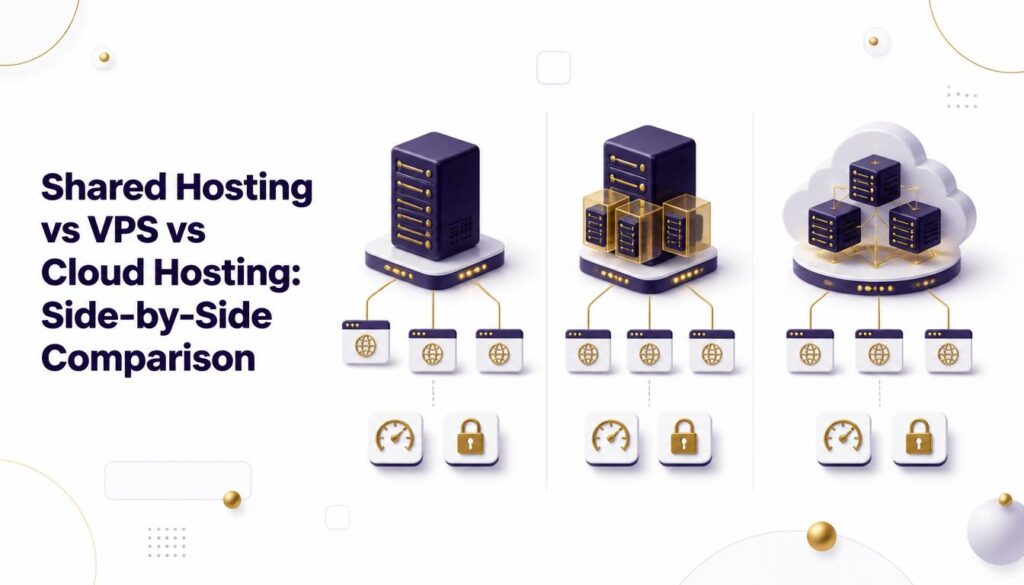
Here’s a quick breakdown of how the three stack up on the factors that matter most:
Cost: Shared hosting is the cheapest option available; VPS costs more but offers dedicated resources; cloud hosting typically uses pay-as-you-go pricing that scales with actual usage.
Performance: Shared hosting can dip under heavy load from neighboring sites; VPS delivers stable, predictable performance thanks to reserved resources; cloud hosting scales resources on demand to absorb traffic spikes in real time.
Scalability: Shared hosting has limited upgrade paths and often requires a full plan change; VPS scaling usually means moving to a bigger plan tier; cloud hosting scales almost instantly, often automatically, without downtime.
Technical control: Shared hosting offers minimal customization since the environment is managed for everyone; VPS gives root access and full server control; cloud hosting varies by provider but often includes both managed and self-managed tiers.
Reliability: Shared hosting depends entirely on one server’s health; VPS is isolated but still tied to a single physical machine; cloud hosting’s distributed nature means significantly less risk of total downtime.
Setup complexity: Shared hosting is the simplest to set up, often live within minutes; VPS requires more configuration, especially unmanaged plans; cloud hosting complexity depends on the provider, ranging from beginner-friendly to highly technical.
According to Cloudflare’s learning resources, the ability to draw resources from multiple servers is what gives cloud infrastructure its resilience advantage over single-server setups — a distinction that matters most once your site depends on consistent uptime.
Real-World Scenarios: Which One Fits Your Site?

Sometimes it’s easier to decide by example than by spec sheet. Here’s how the comparison plays out in practice.
The new local bakery site. A five-page site with a menu, contact form, and location map gets a few hundred visitors a month. Shared hosting handles this easily, and the low monthly cost matters far more than raw performance headroom.
The growing online course platform. As enrollment climbs into the thousands, video streaming and login traffic start to strain shared resources. Moving to VPS hosting gives this site dedicated RAM and CPU, keeping video playback smooth even during peak enrollment periods.
The seasonal e-commerce store. A retailer that sees traffic multiply tenfold during a holiday sale needs infrastructure that can expand instantly and shrink back down afterward. Cloud hosting’s on-demand scaling avoids both the cost of overprovisioning year-round and the risk of crashing during the sale itself.
The SaaS startup. With unpredictable growth curves and zero tolerance for downtime, a SaaS product benefits from cloud hosting’s redundancy across multiple servers, ensuring a single server failure never takes the whole platform offline.
Pricing: What You’re Really Paying For

It helps to think of the price difference between these three tiers as a reflection of how much dedicated infrastructure you’re renting.
Shared hosting plans are inexpensive because you’re splitting server costs across many customers. VPS hosting costs more because you’re guaranteed a fixed slice of that server’s resources, whether you use them or not. Cloud hosting’s usage-based pricing means your bill tracks your actual traffic and resource consumption, which can be cheaper during quiet months and higher during busy ones.
When comparing quotes, look beyond the advertised monthly price. Renewal rates, bandwidth caps, backup frequency, and support response times all affect the real cost of ownership — and they vary significantly between providers even within the same hosting tier.
[internal link: relevant page about hosting migration services]
Which One Should You Choose?
Ask yourself three questions:
- How much traffic do you actually get? Under a few thousand monthly visitors, shared hosting is usually fine.
- How predictable is your traffic? Steady, moderate traffic favors VPS. Spiky or seasonal traffic favors cloud hosting.
- What’s your budget for growth? If you’re planning to scale fast, cloud hosting avoids painful mid-year migrations and the downtime that often comes with them.
For most businesses, the real answer is a hosting roadmap: start on shared hosting, move to VPS once you have consistent traffic, and shift to cloud hosting when reliability and scale become non-negotiable. Treating hosting as something you’ll revisit as you grow — rather than a one-time decision — keeps both your costs and your performance aligned with reality.
Common Mistakes to Avoid
Overbuying too early. Jumping straight to cloud hosting for a five-page brochure site wastes budget you could put toward marketing or design.
Waiting too long to upgrade. The most expensive mistake is staying on shared hosting after your traffic has outgrown it, leading to slow load times, higher bounce rates, and lost conversions.
Ignoring support quality. Whichever tier you choose, verify the provider’s support responsiveness — according to HostingAdvice’s research, support quality is one of the biggest differentiators between otherwise similar hosting plans.
Skipping backup and security checks. Regardless of hosting type, confirm what backup frequency, malware scanning, and SSL provisioning are included by default rather than assuming they are.
Frequently Asked Questions
Can I switch between shared hosting, VPS, and cloud hosting later? Yes. Most providers support migrations between tiers, though moving between different companies entirely can require more manual work.
Is cloud hosting always more expensive than VPS? Not necessarily. For low, steady traffic, VPS can actually cost less than cloud hosting’s usage-based pricing. Cloud hosting’s value shows up most clearly when traffic is unpredictable.
Do I need technical skills to manage a VPS? Only if you choose an unmanaged plan. Managed VPS hosting shifts most technical maintenance back to the provider.
Conclusion
Choosing between shared hosting vs VPS vs cloud hosting really comes down to matching infrastructure to your current traffic — and your growth plans for the next year or two. Shared hosting is the budget-friendly starting point, VPS offers stability once you outgrow that, and cloud hosting delivers the scalability serious, fast-growing sites need.
If you’d rather skip the guesswork, Elyspace can help you audit your current setup and map out the right hosting path for where your site is headed next — so you upgrade exactly when it makes sense, not a moment too soon.